Vauz says this address looks like another site
Vauz reads the web address the way your browser really sees it. When the address is built to be mistaken for a site you know, it says so in an orange box above the login field.
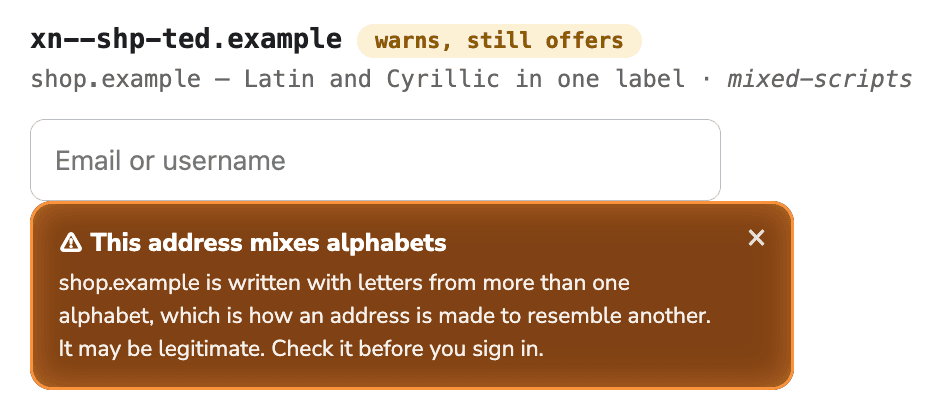
There are two levels. Vauz either refuses to fill anything, or warns you and leaves the choice with you. Which one you see depends on how certain the resemblance is.
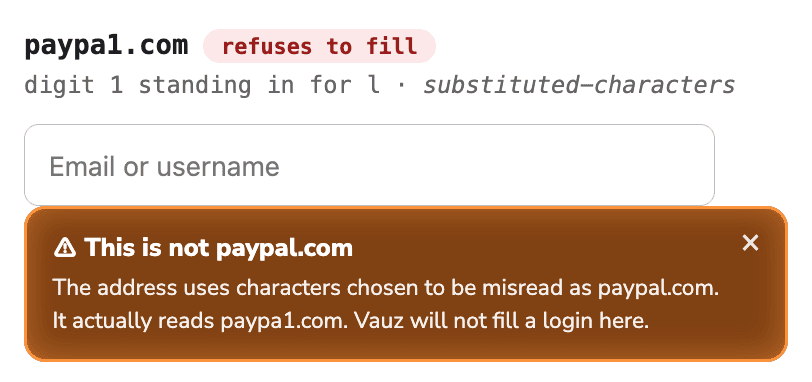
When Vauz refuses to fill
These messages end with "Vauz will not fill a login here." No Vauz mark appears on the page and no login is released. Closing the warning does not change that — closing a warning is not a decision about whether a site is genuine.
"This is not github.com"
The address uses letters that only look like ordinary ones. Vauz will not fill a login here.
Some letters in other alphabets are drawn identically to Latin ones. The Cyrillic і and the Latin i are different characters that look the same, so an address can be registered that is indistinguishable from a site you use.
Underneath the message Vauz shows the address as your browser really reads it, with the offending characters highlighted — otherwise you would be looking at two identical-seeming names with no way to tell which is which. That highlight is the useful part of the warning: it points at the one character that is not what it seems.
"This address uses disguised characters"
Its letters are drawn from more than one alphabet…
The same trick, where the result does not spell out any particular well-known site. The address is still built to be misread, so Vauz stays out of it.
"This is not paypal.com" (characters chosen to be misread)
The address uses characters chosen to be misread as paypal.com. Vauz will not fill a login here.
No other alphabet needed: a digit 1 in place of the letter l, a 0 for an o, or the
pair rn read as m. At a glance rnicrosoft.com and microsoft.com are the same word. These
are highlighted in the same way.
What to do. Do not sign in. Type the address you meant into the address bar yourself, or reach the site through a bookmark. If you arrived by clicking a link in an e-mail or a message, treat that message as hostile.
When Vauz warns but still offers
These messages end with "Check the address before you sign in." Your saved logins are still offered, and the warning is repeated in the list. A similar name is a reason to look twice, not proof of anything — plenty of legitimate sites have names close to other legitimate sites.
"This is not github.com" (one character different)
githuh.com is one character different.
A plain misspelling of a well-known name — the sort of address registered to catch typing mistakes.
"This site is evil-example.com, not github.com"
The address begins with github.com, but the site it actually belongs to is evil-example.com.
The part of an address that decides which site you are on is the end, not the beginning.
github.com.evil-example.com belongs to evil-example.com. This is probably the most common shape
a deceptive link takes, because it reads correctly from left to right.
"This site is paypal-login.com, not paypal.com"
paypal.com appears in this address, but the site it belongs to is paypal-login.com.
A familiar name used as one part of a longer name. Companies do sometimes register addresses like this, so it is a prompt to check rather than an accusation.
"This address mixes alphabets"
…is written with letters from more than one alphabet.
Unusual, and the technique behind the impersonations above, but not proof of anything on its own — some genuine addresses mix a local-language word with an English one.
What to do. Look at the address bar and satisfy yourself it is the site you meant. If it is, carry on, your logins are still there.
What this check does not do
It recognises a list of commonly impersonated sites. An address bearing no resemblance to any of them passes without comment, and a site can be fraudulent under a name entirely its own. It is a reason to look at the address bar, never a substitute for doing so.
It runs entirely inside the extension. It never asks the Vauz app which sites you have saved, so no website can use it to work out where you hold accounts.
If Vauz warns you about a site you know is genuine
Please tell us, with the address. A warning on an ordinary site is a bug, and one worth fixing quickly — a warning people learn to dismiss protects nobody.